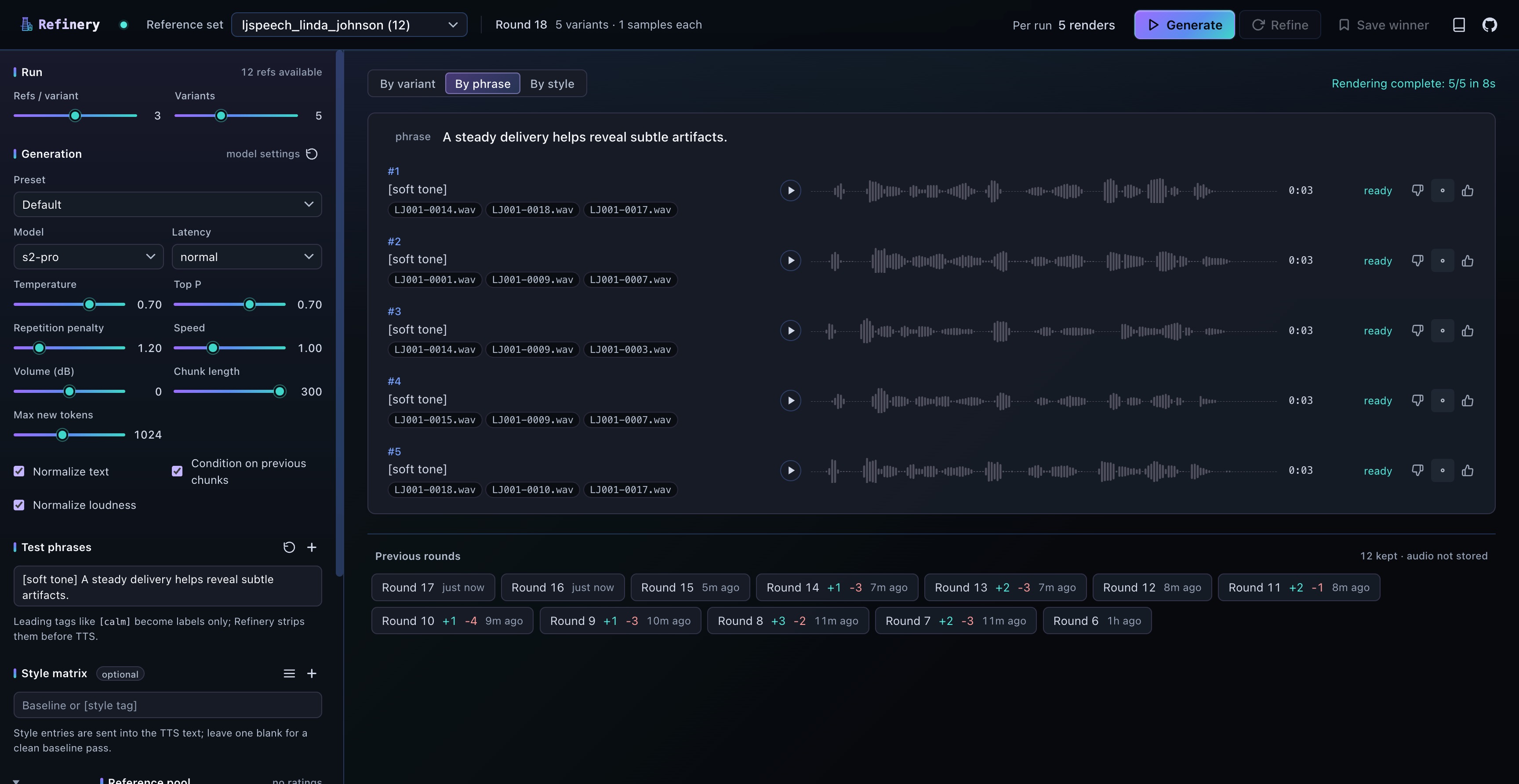
Find the best reference clip combinations for voice cloning.
For
Fish Audio and
Fish-Speech.
Refinery generates candidate ref combinations, renders them against
the same phrases and styles, lets you favorite the best outputs, and
biases the next round toward those refs.
Compare reference combinations, tune model settings, rate outputs,
and refine until satisfied.
Why
Voice cloning with Fish Audio and Fish-Speech depends heavily on the
reference clips you condition on. Two different 3-of-5 picks from the
same speaker can produce noticeably different output. Without
structure, picking the best combination is an open-ended listening
session.
Refinery wraps that listening session in a refinement loop. Render candidates
against the same phrase, mark the ones that sound right, run another
round biased toward refs from your favorites. Two or three passes
usually converge.
Random K-of-N
Sample candidate ref combinations from your folder.
Render variants
Generate each variant against the same test phrases (and optional
S2 style tags).
Listen and mark
Compare variants side-by-side. Mark the ones that sound right.
Refine
Next round gives favorited refs 2× weight; at least half the
new variants inherit a favorite.
Listen
Same speaker (public-domain LJSpeech), same phrase, same model. Only
the reference combination differs between rounds. Round 1 is a random
pick; round 3 is what Refinery converged on after two refinement
passes.
Round 1 · naive pick
0:00
K=3 of 5 references, chosen uniformly at random.
Round 3 · refined
0:00
K=3 of 5 references, after two favorite-weighted refinement
rounds.
Rendered with Fish Audio's s2-pro model on the bundled
LJSpeech sample voice. The full recipe is reproducible from the JSON
export Refinery generates.
Read the refinement algorithm.
More
TTS controls
Model, latency, sampling, prosody, chunking, and long-form
generation parameters exposed in the UI. Sensible defaults; tune
when needed.
Backends
Run against hosted Fish Audio, Docker Compose Fish-Speech (NVIDIA
CUDA), or native macOS Fish-Speech on Apple Silicon (MPS).
Reproducible
JSON recipe export, in-memory TTS cache to keep paid endpoints
cheap, batch .lab transcription script for ref folders
you haven't transcribed yet.
Quickstart
Python 3.11+ with uv, plus a
Fish Audio API key or a Fish-Speech server. Pick a path.
git clone https://github.com/mikeharty/refinery.git
cd refinery
cp .env.example .env

# In .env:
# FISH_TTS_URL=https://api.fish.audio/v1/tts
# FISH_API_KEY=your_api_key_here
# FISH_MODEL=s2-pro

uv sync
uv run uvicorn app:app --host 0.0.0.0 --port 5055 --reload
# Open http://localhost:5055
git clone https://github.com/mikeharty/refinery.git
cd refinery
cp .env.example .env

# Linux/WSL with an NVIDIA CUDA GPU (24GB+ VRAM recommended for S2-Pro)
docker compose --profile download run --rm fish-models
docker compose --profile fish up --build
# Open http://localhost:5055
Full configuration reference, including all
FISH_* environment variables and the Apple Silicon
installer flags, lives in the
README.